


VC Desktop Software
softclient for PC

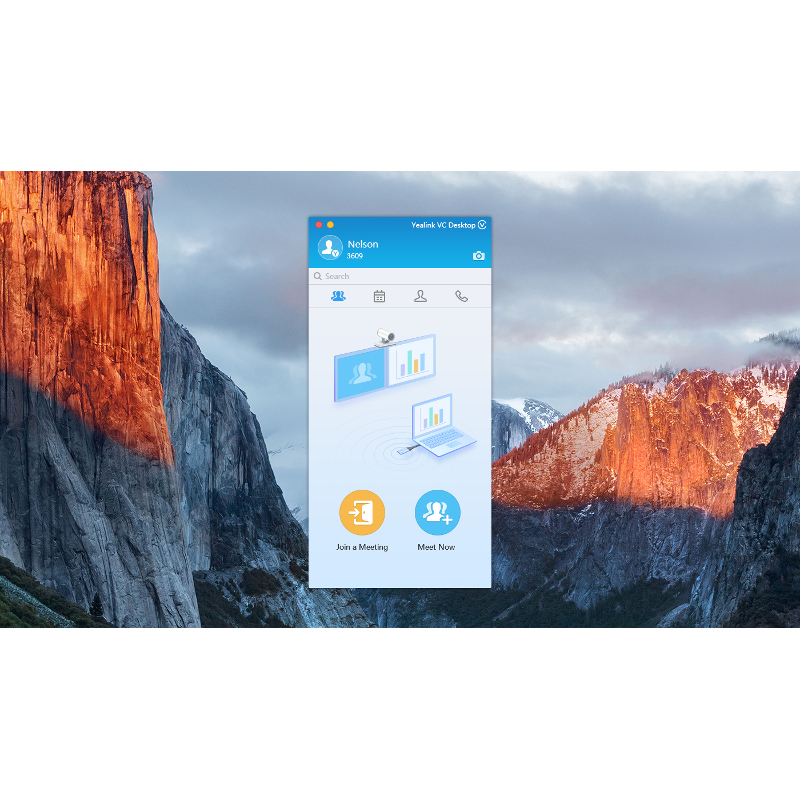
Personal Video Collaboration Software
Yealink VC Desktop is the latest addition to Yealink’s innovative One-stop Video Conferencing Solution, mainly for the people who work in the office, in business travel or at home. Yealink VC Desktop is a high-quality, best-in-class high definition (HD) video collaboration program created to streamline communication for today’s businesses. The product offers an optimal one-click setup process with rapid automatic installation, eliminating the need for lengthy, manual efforts. End users will also benefit from the product’s easy navigability over a HD display. Yealink VC Desktop is highly-compatible with a broad range of Windows® versions, including Windows® XP, as well as versions 7, 8 and 10, and also compatible with MAC OS 8 or later. What’s more, Yealink VC Desktop supports Network Address Translation (NAT), as well as Yealink’s Intelligent Firewall Traversal for risk-free video conferencing. With its superior bandwidth adaptability and up to 8% packet loss resistance, Yealink VC Desktop is without question an ideal option for first class video conferencing and collaboration.
- Yealink VC Cloud Management Service
- HD Video/Audio
- Full HD Content Sharing
- H.323/SIP dual-protocol support
- H.264 High Profile, saving 50% bandwidth
- Bandwidth Adaptability
- Yealink Intelligent Firewall Traversal
- One-click Setup & Ease-of-use
Key Features and Benefits
Yealink VC Cloud Management Service
Carried with Yealink VC Cloud Management Service and no messing around with settings, Yealink VC Desktop enables you to have a HD video conferencing by simply dialing Cloud number whenever and wherever you like.
HD audio and video
Yealink VC Desktop offers 720P HD streaming video, as well as 1080P full HD content sharing. Coupled with HD audio—as well as H.264 high profile video coding— Yealink VC Desktop allows for high quality and smooth face-to-face interactions for users.
H.323/SIP dual-protocol support
The product features broad interoperability with H.323/SIP dual-protocol support. As a result, the product is compatible with other mainstream video conferencing equipment and other communication devices, enabling users more flexibly and effectively expand their overall reach in a way that is truly impactful and effective.
Excellent network adaptability
Yealink VC Desktop is with the excellent network adaptability, wherever and whenever you can have a video collaboration easily in all network environment. Yealink VC Desktop is able to support multiple network traversal modes for greater adaptability, including network address translation (NAT), H.460 and more. In addition, the program’s Intelligent Firewall Traversal enable end users to quickly and easily access to video collaboration once users connect to the network; the product’s bandwidth dynamic adaptive adjustment feature guarantees superb video conferencing experiences, even under fluctuating network conditions.
One-click setup and ease of use
This next-generation product was created with the ultimate user experience in mind. Through its unique one-click setup, Yealink VC Desktop allows for automatic installation and online auto upgrade. And of course, this sleek and efficient product is just as easy to use as it is to set up.
Video Resolution
- 720P (1280 x 720), from 512Kbps
- W448P (768 x 448)
- 4CIF (704 x 576), CIF (352 x 288)
Video Standard and Network Adaptability
- H.264 High Profile, H.264, H.263
- Bandwidth dynamic adaptive adjustment
- Forward Error Cor rection (FEC), anti 8% video and 20% audio packet loss
- Bandwidth auto adaptive/Protocol auto adaptive/Audio/Video call auto adaptive
Audio Features
- Audio codecs: G.722.1C, G.722.1, G.722, G.711 u/a
- Full Duplex
- DTMF
- Automatic Gain Control (AGC)
- Automatic Echo Cancellation (AEC)
- Voice Activity Detection (VAD)
- Comfort Noise Generator (CNG)
- Packet Loss Concealment (PLC)
- Adaptive Jitter Buffer (AJB)
Licensing
- Online Activation
- Offline Activation
Call Features
- 720P video+1080P content sharing
- Call statistics
- Auto answer, video & audio mute
- Smart dialing
- Local directory: 500 entries
- Call history: 100 entries (all/missed/received/dialed)
- Languages supported: English, Chinese, French, German, Italian, Polish, Portuguese, Spanish, Trukish
- Online auto upgrade
Standard Communication Protocol
- H.323/SIP
- Dual stream protocol: H.239/BFCP (SIP)
- H.323 protocol suite: H.225, H.241, H.245, H.235 v3
- Flow control
- Support GK account and SIP account
Network and Security
- TCP/IP, DHCP/stastic IP
- SRTP/TLS, AES encryption
- Network environment: LAN, Wi-Fi, 3G/4G
- NAT (manual/auto mode)
- Yealink Intelligent Firewall Traversal
- H.460
- STUN, TURN, ICE
System requirements
- Operating systems: For Windows® : Windows® XP, Windows® 7, Windows® 8, Windows® 10, For Apple Mac OS X ®: Mountain Lion (10.8), Mountain Lion (10.8) Yosemite (10.10), El Capitan (10.11)
- Software: DirectX 9.0 or higher
- Processor: Intel Core i3, 1.7GHz or higher
- RAM: 4GB
- Video memory: Minimum 256M RAM
- 200 MB storage
- Camera: Integrated or External
- Audio: Microphone and Speaker
Audio & Video Devices Requirement
- Standard USB web camera
- Built-in camera
- 3.5 mm headset
- USB headset
Related Products


Related Categories
 Cloud-based video conferencing
 VC Cloud Management
INFORMATION
CONTACT US
Assono Hungary Telecommunications Ltd.
Office: Róna utca 120-122., Budapest, H-1149 Hungary
Phone: (+36 1) 801 8500, (+36 1) 273 2150
E-mail: info@assono.hu
You can pay by credit card.
